ScriptFabric Configuration & Usage Guide
Step-by-Step GitHub Integration, Webhooks & Event Handlers on Atlassian Forge
Plugin: ScriptFabric for Jira (Canarys)
Platform: Atlassian Forge (Cloud)
Feature: GitHub Webhook Event Handlers
1. Executive Summary: GitHub Integration
The GitHub Integration in ScriptFabric enables seamless, secure, and event-driven automation between GitHub repositories and Jira Cloud. It provides automated repository webhook management, secure event ingestion, and serverless execution of custom automation scripts without requiring external webhook relays or intermediate infrastructure.
Key GitHub Capabilities
- Secure Authentication: Connects GitHub accounts using Personal Access Tokens (PAT — classic or fine-grained) requiring
'repo'(repository discovery & access) and'admin:repo_hook'(automated webhook creation & management) permissions. - Automated Webhook Lifecycle: Directly provisions and synchronizes webhook subscriptions on selected GitHub repositories using Atlassian Forge Webtrigger endpoints, eliminating manual webhook configuration in GitHub repository settings.
- Payload Verification & Security: Inbound GitHub webhook requests are cryptographically validated using HMAC SHA-256 (
X-Hub-Signature-256) signatures against an auto-managed webhook secret. - Event Subscription & Triggering: Subscribes to granular repository events including Git pushes (
push), pull request workflows (pull_request,pull_request_review), issues, branches, releases, and GitHub Actions workflow runs. - Runtime Context (
context.github): Injects structured GitHub event data—including commits, branches, pull request details, delivery IDs, sender info, and raw payloads—into ScriptFabric event handlers. - Automated Jira Actions: Parses commit messages and pull request references (e.g.,
ST-64268) in real time to automatically comment on Jira issues, transition workflows, update issue development status, or execute custom business logic.
2. Detailed Step-by-Step Explanation of Screenshots
Accessing ScriptFabric Workspace
In Jira Administration, navigate to Jira Admin Settings > Apps > ScriptFabric under Marketplace Apps.
Navigating to Settings Menu
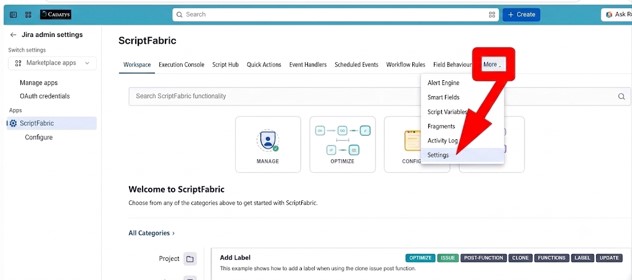
- On the top navigation bar, locate and click the 'More ▾' dropdown button.
- Action: Click 'Settings' to open global app configurations, integration tokens, and credentials.
Settings Hub & Integrations Overview
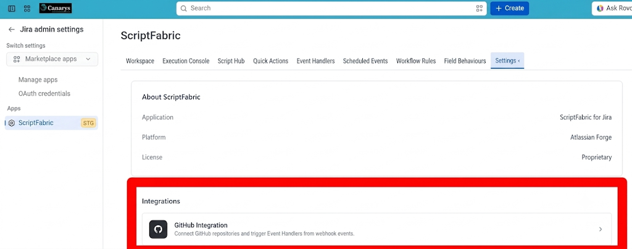
- The Settings view displays technical information about the ScriptFabric application.
- Integrations Card: Highlights the 'GitHub Integration' connector card ("Connect GitHub repositories and trigger Event Handlers from webhook events").
- Action: Click on the GitHub Integration card to begin the repository connection wizard.
GitHub Personal Access Token (PAT) Authentication
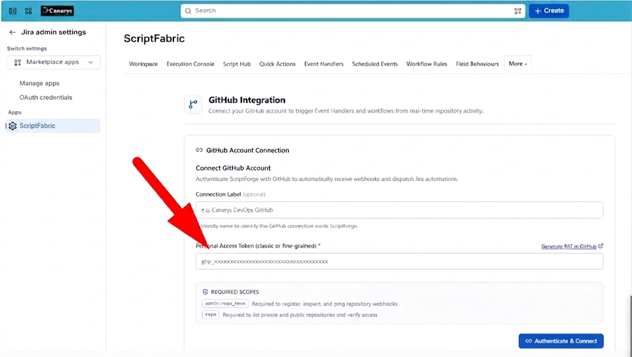
Configure the GitHub account connection credentials to enable repository listing and webhook registration:
- Connection Label (optional): Provide a friendly display name (e.g.,
'Canarys DevOps GitHub'). - Personal Access Token: Paste a classic or fine-grained GitHub token starting with
'ghp_...'. - Required GitHub Scopes:
'admin:repo_hook'(needed to create, ping, and manage repository webhooks) and'repo'(needed to list public/private repositories and verify access) based on your specific use case.
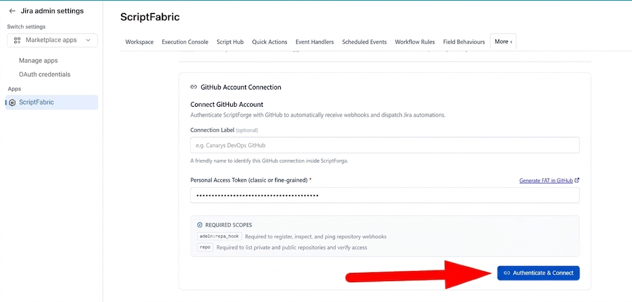
- Action: Click the blue 'Authenticate & Connect' button.
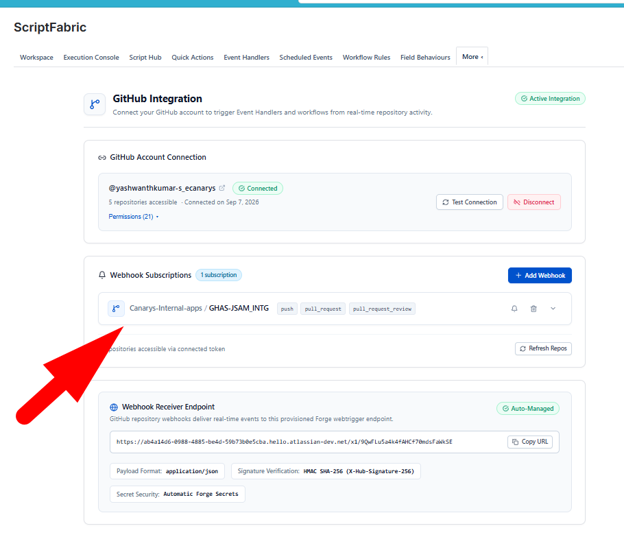
Active GitHub Connection & Adding Webhook Subscription
Once verified, ScriptFabric confirms the connection status and exposes the Webhook management engine.
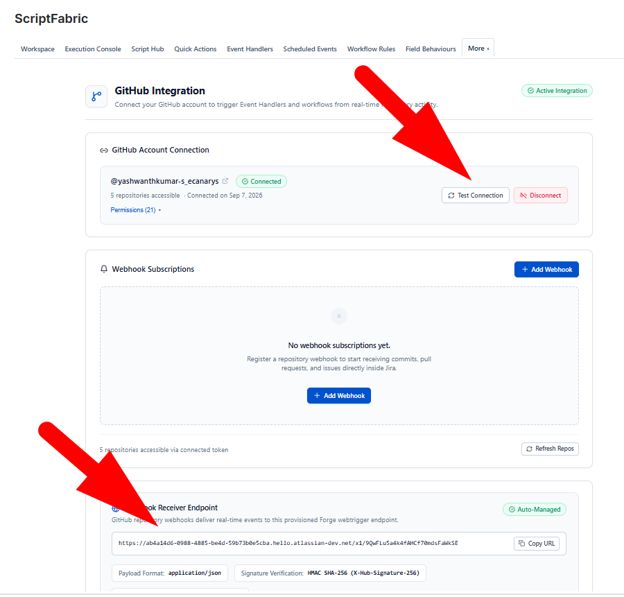
- Connection Status: Shows 'Connected' with GitHub handle (e.g.,
@yashwanthkumar-s_ecanarys), accessible repository count (5 repos), and connection timestamp. - Auto-Managed Webhook Receiver Endpoint: Forge webtrigger URL with HMAC SHA-256 (
X-Hub-Signature-256) signature verification.
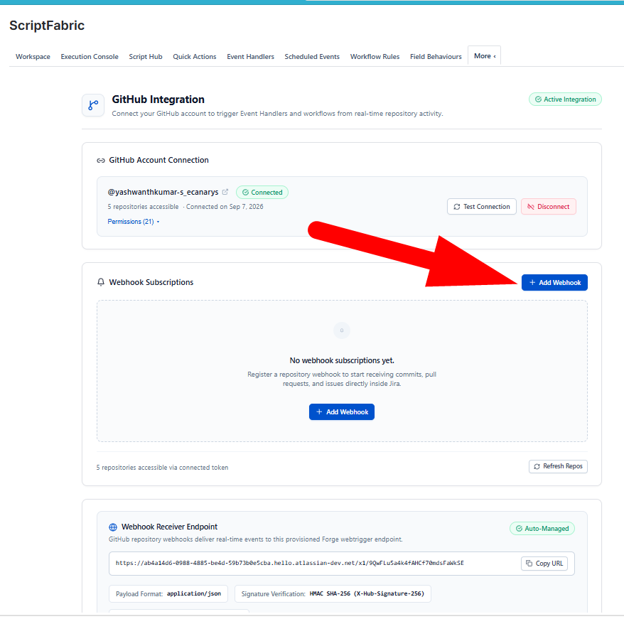
- Action: Click '+ Add Webhook' to register a repository.
Repository Selection, Event Subscription & Confirmation
Select ScriptFabric to listen to real-time events on your specific Git repository. The webhook will be created in this selected repo only (hence the automation will only work for this repository).
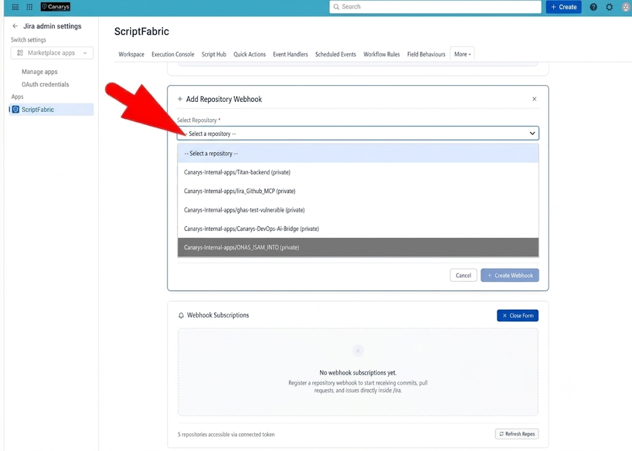
- Repository Dropdown: Select the target repository (e.g.,
'Canarys-Internal-apps/GHAS-JSAM_INTG (private)'). - Events Selection: Check desired triggers (e.g.,
'Push','Pull Request','PR Review').
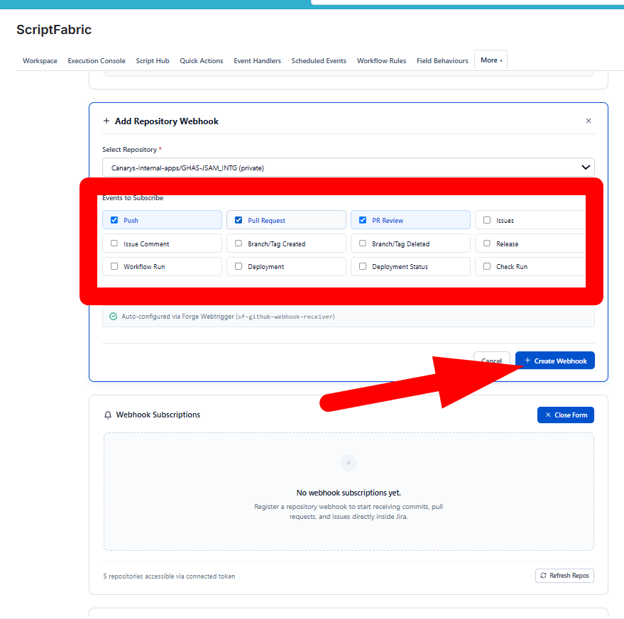
- Creation: Click '+ Create Webhook'. ScriptFabric registers the Forge webtrigger endpoint directly into GitHub via API.
- Verification: The repository appears in the 'Webhook Subscriptions' table with badges
'push','pull_request','pull_request_review'.
Creating & Authoring the GitHub Event Handler
Build the automated logic executed when GitHub sends an incoming event payload.
- Event Source: Navigate to 'Event Handlers' tab > click 'Create Event Handler' > select 'GitHub Events'.
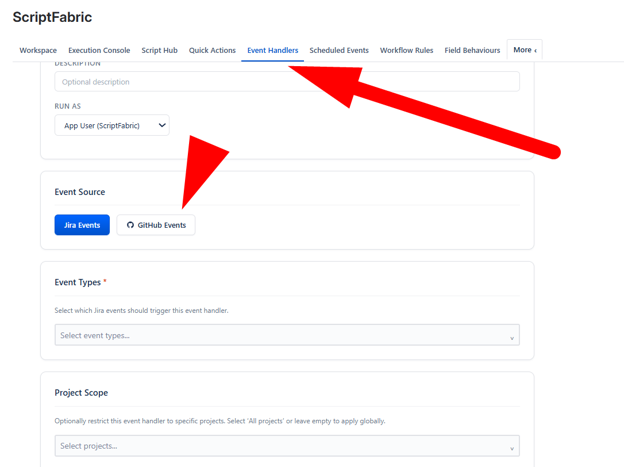
- Target Configuration: Select GitHub Repository (
'GHAS-JSAM_INTG') and Event Types ('Push','Pull Request','PR Review').
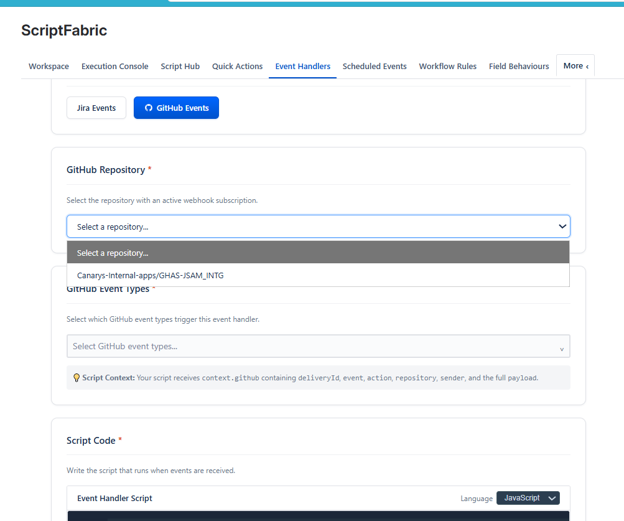
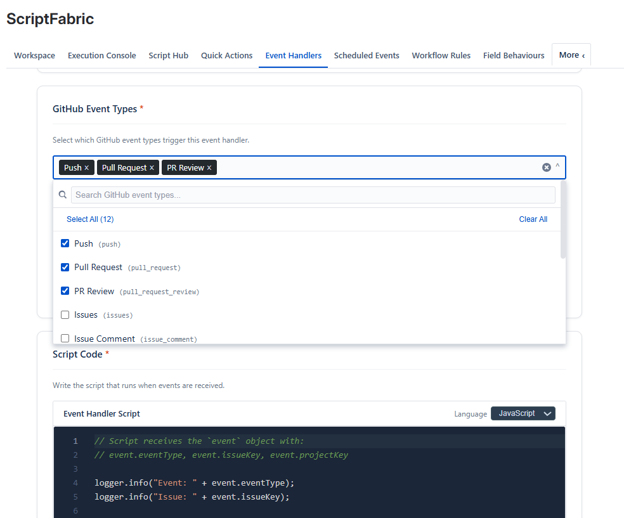
- Runtime Context: Injects
'context.github'containingdeliveryId,event,action,repository,sender, and the full payload. - Handler Script Code (JavaScript): Extracts commit messages, SHA, branch, and author, then logs details and matches Jira issue keys to post automated comments.
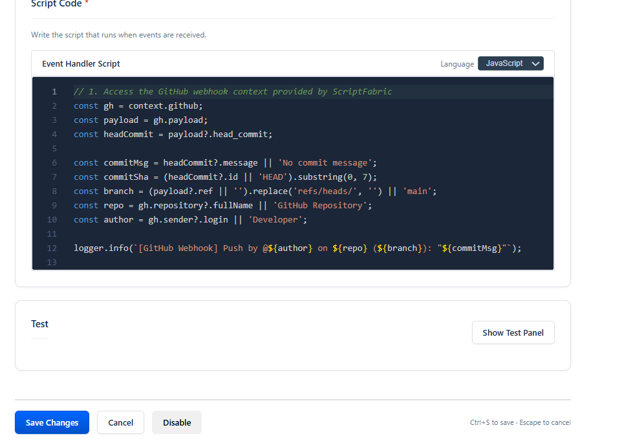
- Action: Click 'Save Changes' (or press Ctrl+S) to activate the listener.
Execution History, Logs & Verification
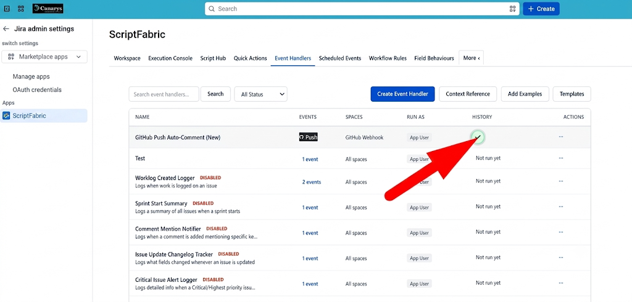
Monitor and verify real-time handler execution in the ScriptFabric Execution Console.
- History Status: Displays a green success checkmark with latency metrics (e.g.,
'Success — 456ms — 9/7/2026, 2:52:16 PM').
- Execution Details Modal: Displays status (
'success'), duration ('456ms'), executed by ('event-trigger'), and script ID ('lst_mtr15y2t_shgh4n').
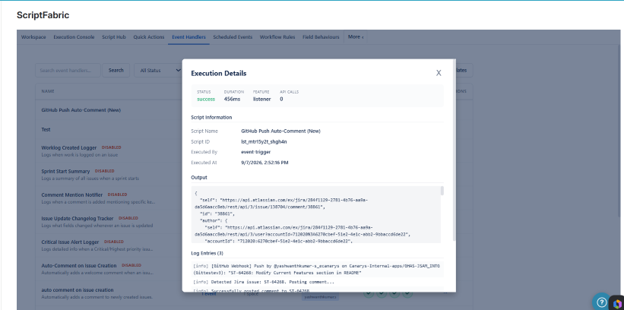
- Log Output: Confirms receipt of GitHub push event for commit message
'ST-64268: Modify Current Features section in README', parses issue key'ST-64268', and posts a comment via Jira REST API endpoint'/rest/api/3/issue/138704/comment'.
3. End-to-End Configuration Quick Reference
| Step | Action Required | Success Criteria |
|---|---|---|
| 1. Generate PAT | Create GitHub token with 'repo' and 'admin:repo_hook' permissions. |
PAT string generated (ghp_...) |
| 2. Connect Account | Enter PAT in ScriptFabric Settings > Integrations > GitHub Integration. | Status shows 'Connected' with repo count. |
| 3. Register Webhook | Click '+ Add Webhook', choose repository and events (Push, PR). | Webhook appears in table with event tags. |
| 4. Create Handler | In 'Event Handlers', select 'GitHub Events' and write JavaScript logic. | Script saved and deployed to Forge runtime. |
| 5. Test & Verify | Push a commit referencing a Jira key (e.g., 'ST-64268: Update docs'). |
Execution history logs 200 OK & comments on issue. |