
Work Item History Tracker
Complete audit trail of every issue change in Jira — track updates, analyze activity, restore deleted issues, and export reports.



1. Overview
Issue History for Jira provides a complete audit trail of issue changes, helping teams track updates, analyze activity, and maintain transparency across projects.
This app provides:
- A complete, filterable audit trail of every change across one issue, a project, or the entire site.
- Who made each change, when, and what field was affected — with old and new values shown side-by-side.
- Deleted issue recovery — review and restore soft-deleted Jira work items.
- Bulk revert — select multiple field changes and roll them back in one click.
- Export to Excel, CSV, or PDF for use in external tools.
- Group-based Permissions — restrict or delegate access to each feature per Jira group.
2. Entry Points
The app integrates with Jira through multiple entry points, allowing users to access Work Item History from different contexts:
- Issue Panel — Displays detailed history for a single issue directly within the issue view.
- Project Page — Provides a project-wide view of all issue activity and changes.
- Global Sidebar — Offers centralised access to issue history across all projects.
- Dashboard Gadget — Enables users to visualise and monitor history data directly from Jira dashboards.
3. Feature Reference
3.1 Issue Panel — Single-Issue History
While it is convenient to view the change history for the list of issues, Issue History for Jira also offers a well-structured and customisable report for a single issue. All changes will be presented one by one in vertical order.
Compared to the built-in Jira history, you will get the following:
- Tracks all field-level updates with timestamps and user details.
- Clearly highlights old vs new values for easy comparison.
- Supports filtering by date, user, field, and keyword search.
- Provides multiple viewing formats like table, activity stream, and charts.
- Includes bulk revert functionality to undo selected changes.
- Allows exporting data (Excel, CSV, PDF) and saving filter configurations as reusable reports.
Configuration
- Click on open any required issue.
- Scroll down to the Activity Section and select Issue Tracker.
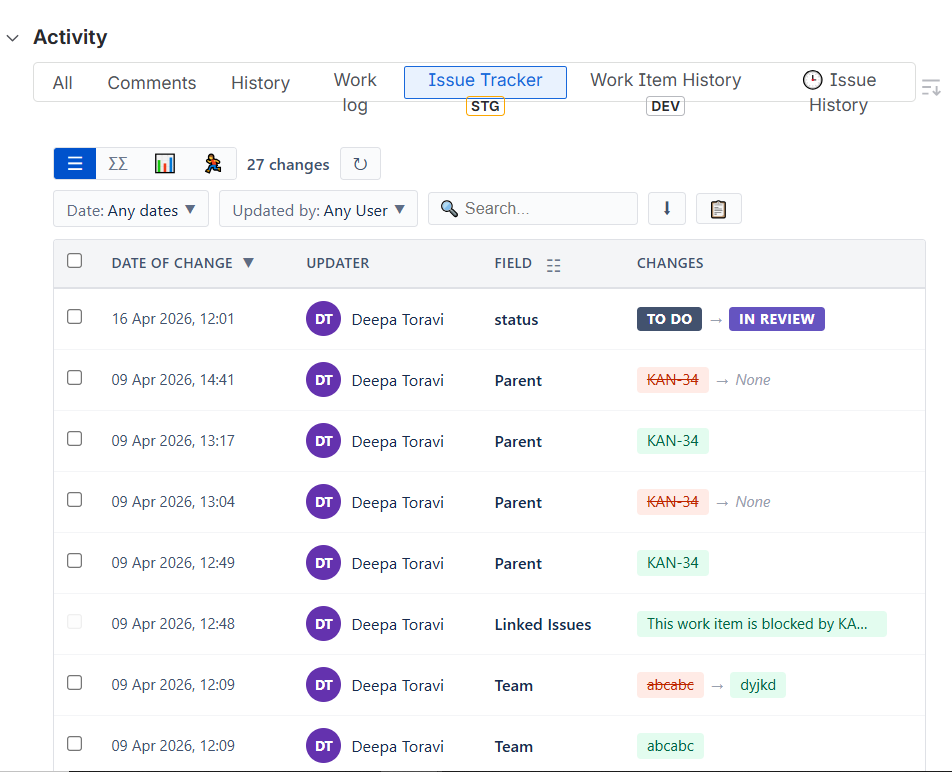
Available filters:
- Date preset ranges (Today, Yesterday, This Week, Last 7 days, Last 28 days, This Month, Previous Month) or a custom date range with From / To date pickers.
- Updated by — searchable dropdown of all users who made edits.
- Field — inline column-header filter; searchable when there are more than 8 unique fields.
- Free-text search — searches across author, field name, old value, and new value.
View modes:
- Table
- Stream (activity feed)
- Dashboard (charts)
Bulk Revert:
- Check one or more rows using the checkbox column.
- Click Revert Selected in the blue bar that appears.
- Review the confirmation modal listing each change to be reverted.
- Click Revert — per-field update calls are made to the Jira API.
- On full success the modal closes automatically; partial failures are shown per row.
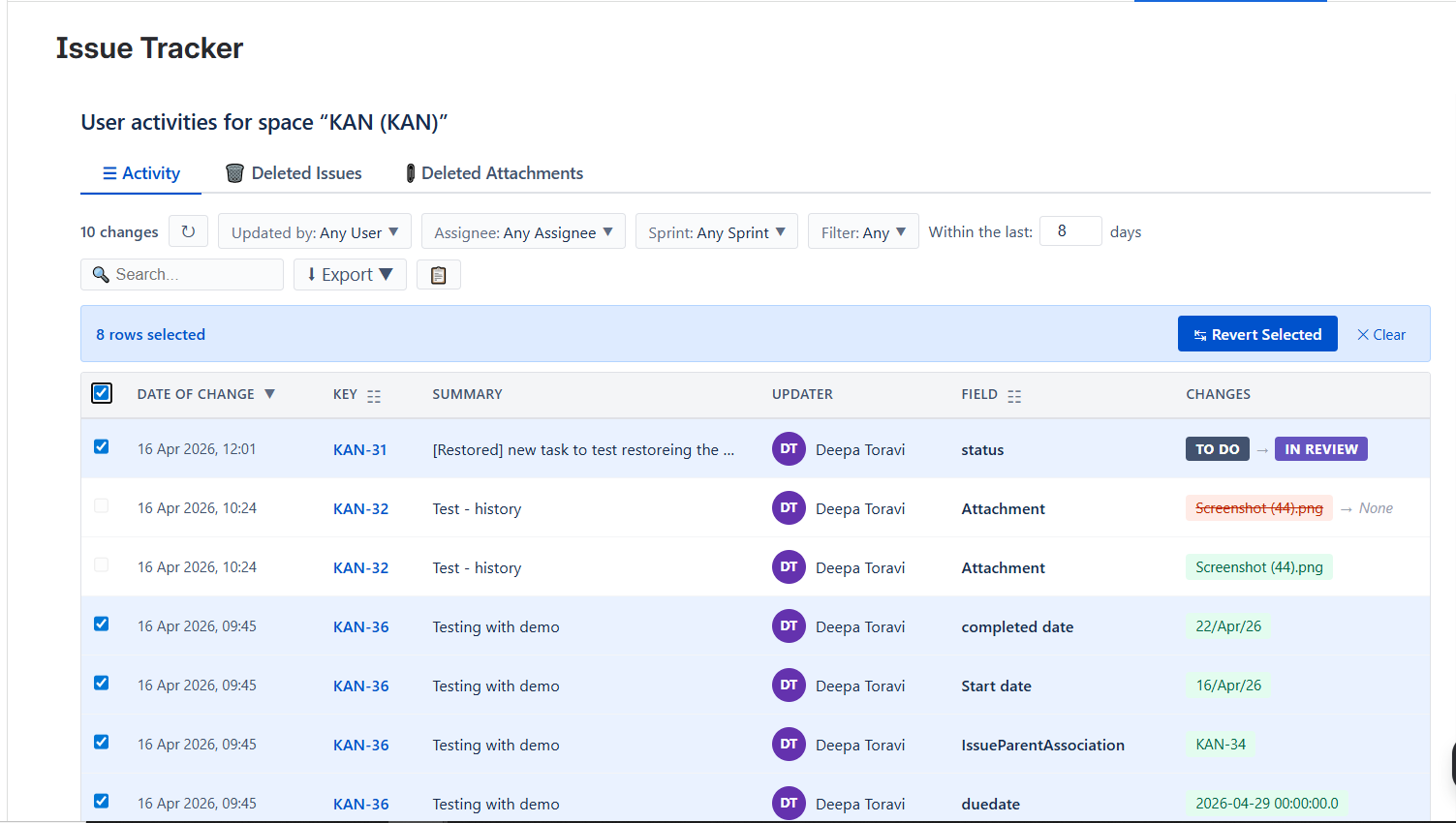
Export: Excel · CSV · PDF (opens print dialog).
Saved Reports:
Snapshot the current filter state under a name; restore later from the Saved Reports panel. Reports can be shared with the team (global visibility).
Sprint History
Sprint History shows all sprint changes made to an issue in a clear timeline. It helps you understand:
- Which sprint the issue moved to and from
- Who made the change
- When the change happened
Where to find: Open any Jira issue → Go to the Activity section → Click Issue Tracker tab → Select Sprint History (🏃 icon).
Each entry shows: User who made the change · Action (moved, added, removed) · From sprint → To sprint · Date and time.
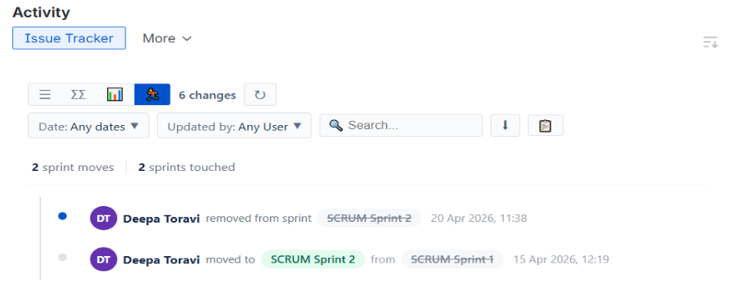
Example: Deepa moved issue from Sprint 1 to Sprint 2 on 15 Apr 2026.
3.2 Project Activity Page
Where: Project left-sidebar → Work Item History.
Displays all field changes across every issue in the project within a configurable time window (default: last 8 days).
Columns: Date · Issue Key (linked) · Summary · Author · Assignee · Sprint · Field · Changes.
3.2.1 Activity — Provides a detailed table of all issue change history.
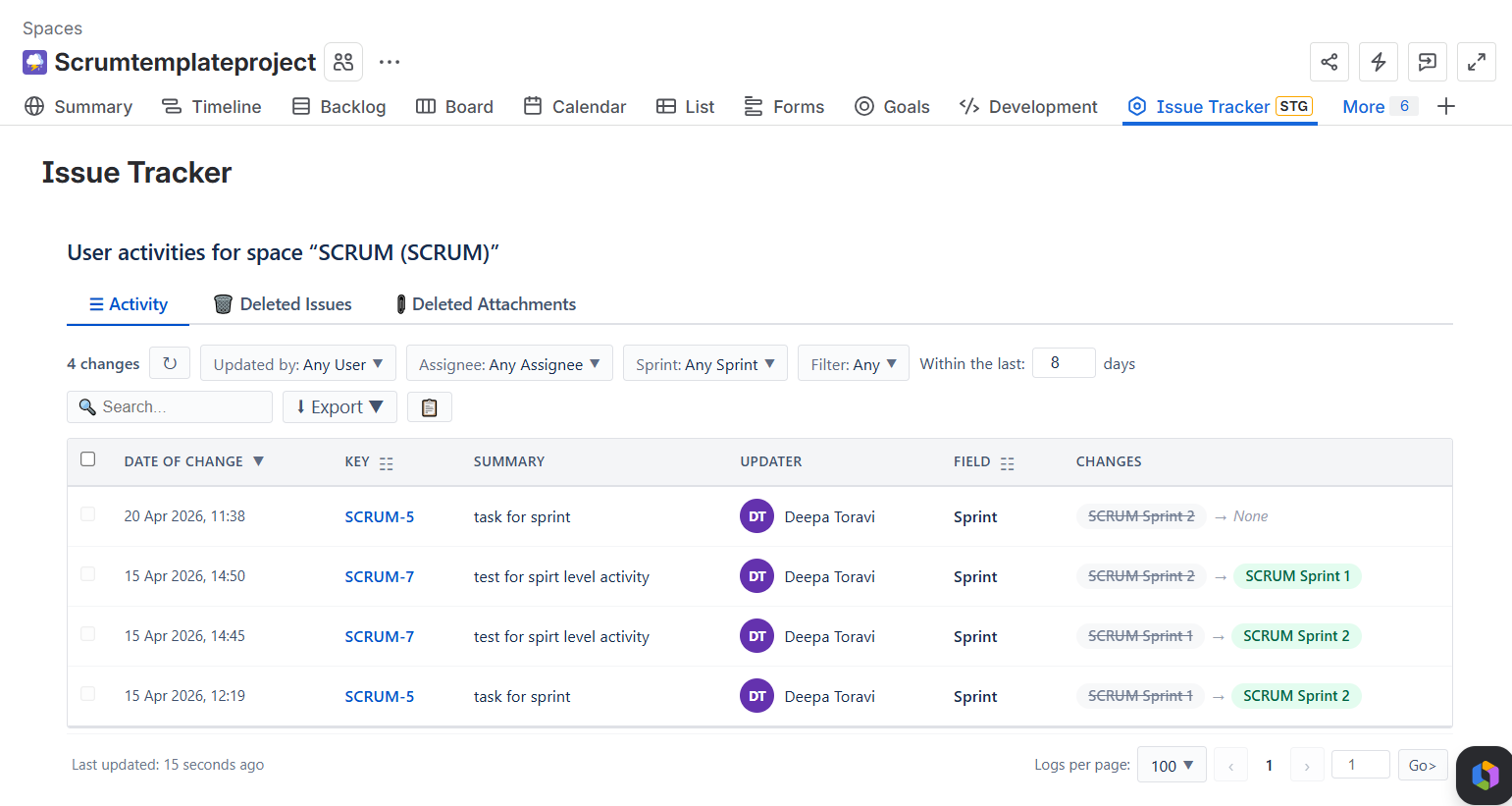 Available filters:
- Updated by — searchable dropdown.
- Assignee — searchable dropdown.
- Sprint dropdown listing all sprints found in the data.
- Issue Key multi-select panel; shows change count per key; searchable.
- Field column-header filter.
- Within the last N days — numeric input; press Enter or click away to reload.
- Free-text search — searches key, summary, author, field, from, and to values.
Sorting: Click the Date of change column header to toggle ascending / descending.
Pagination: Choose 25 / 50 / 100 rows per page; jump-to-page input.
Bulk Revert: Same flow as the issue panel — select rows, click Revert Selected, confirm.
Export: Excel (.xls) · CSV (.csv) — exports all filtered rows, not just the current page.
Saved Reports: Save and restore complete filter presets with a name.
3.2.3 Deleted Attachments Restore
Tracks all deleted attachments in Jira and allows admins to restore them. Prevents permanent data loss.
Where to Find: Project → Issue Tracker → Deleted Attachments.
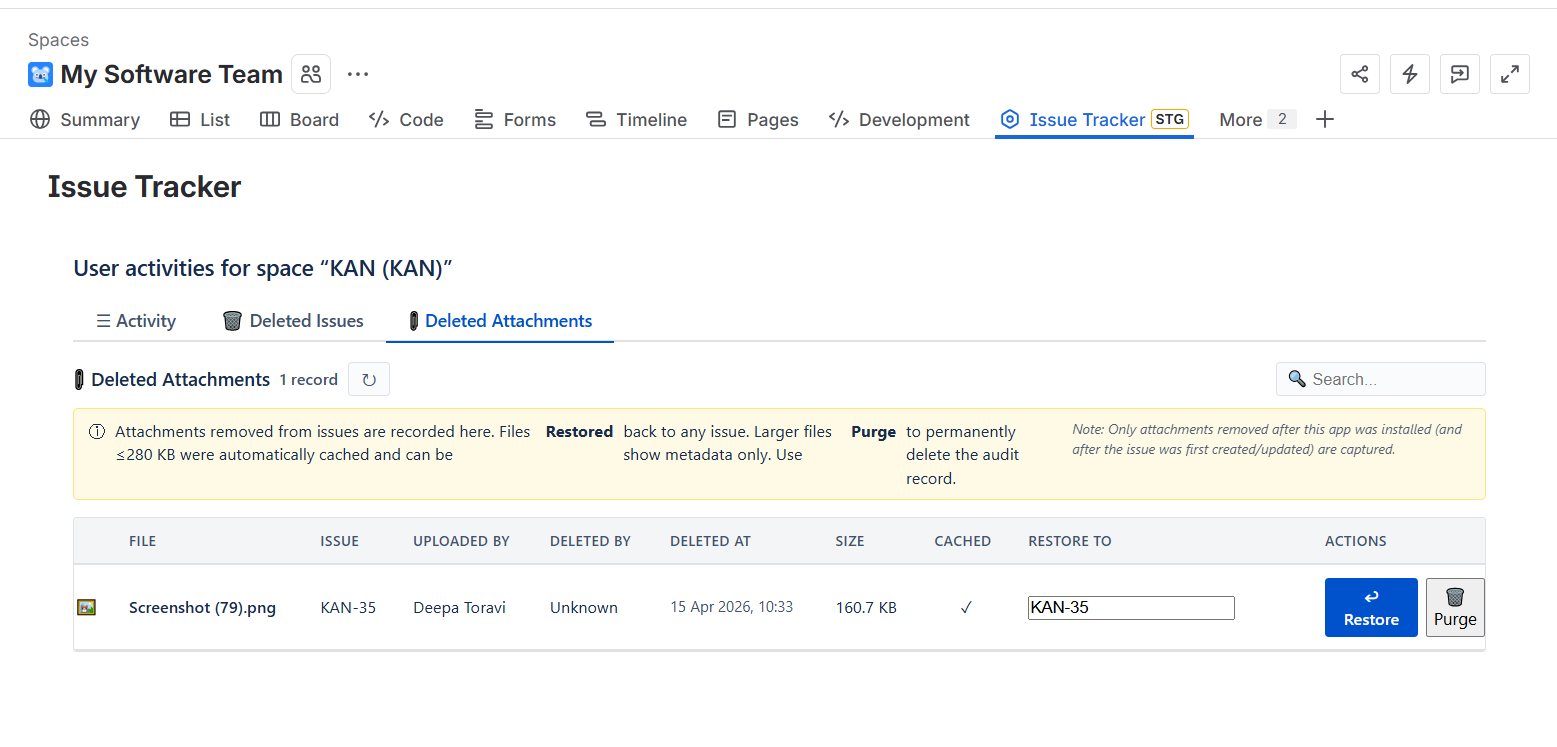
How It Works:
- Automatically tracks when an attachment is deleted.
- Stores file details (name, size, user, date).
- Files ≤ 280 KB → can be restored.
- Files > 280 KB → metadata only.
Limitations:
- Files > 280 KB cannot be restored.
- Only tracks after app installation.
- Admin-only actions.
3.3 Global Activity Page
Where: Jira top navigation → Apps → Issue History.
Tabs:
- Activity — Cross-project history feed for the whole Jira site.
- Permission — Site-wide group-based permissions (site admins only).
Features:
- Space (project) — History for a single selected project.
- Assignee — Changes where the assignee matches a searched user.
- Reporter — Changes created by a searched user.
- Label — Changes on issues with a specific label.
- Sprint — Changes on issues in a specific sprint.
- Filter — Changes matching a saved Jira filter.
- JQL Custom — JQL query; type any valid JQL and press Apply.
- Deleted — Cross-project deleted issue list.
- Column picker — Show/hide individual columns (Date, Updater, Key, Issue Type, Summary, Priority, Status, Field, Changes).
Export: Excel · CSV — exports all filtered rows.
Bulk Revert: Same checkbox-based flow as other views.
3.4 Deleted Issues
Where: Project Activity page → Deleted Issues tab.
A table of soft-deleted Jira issues with: Issue key · Summary · Issue type · Status · Priority · Reporter · Deleted date.
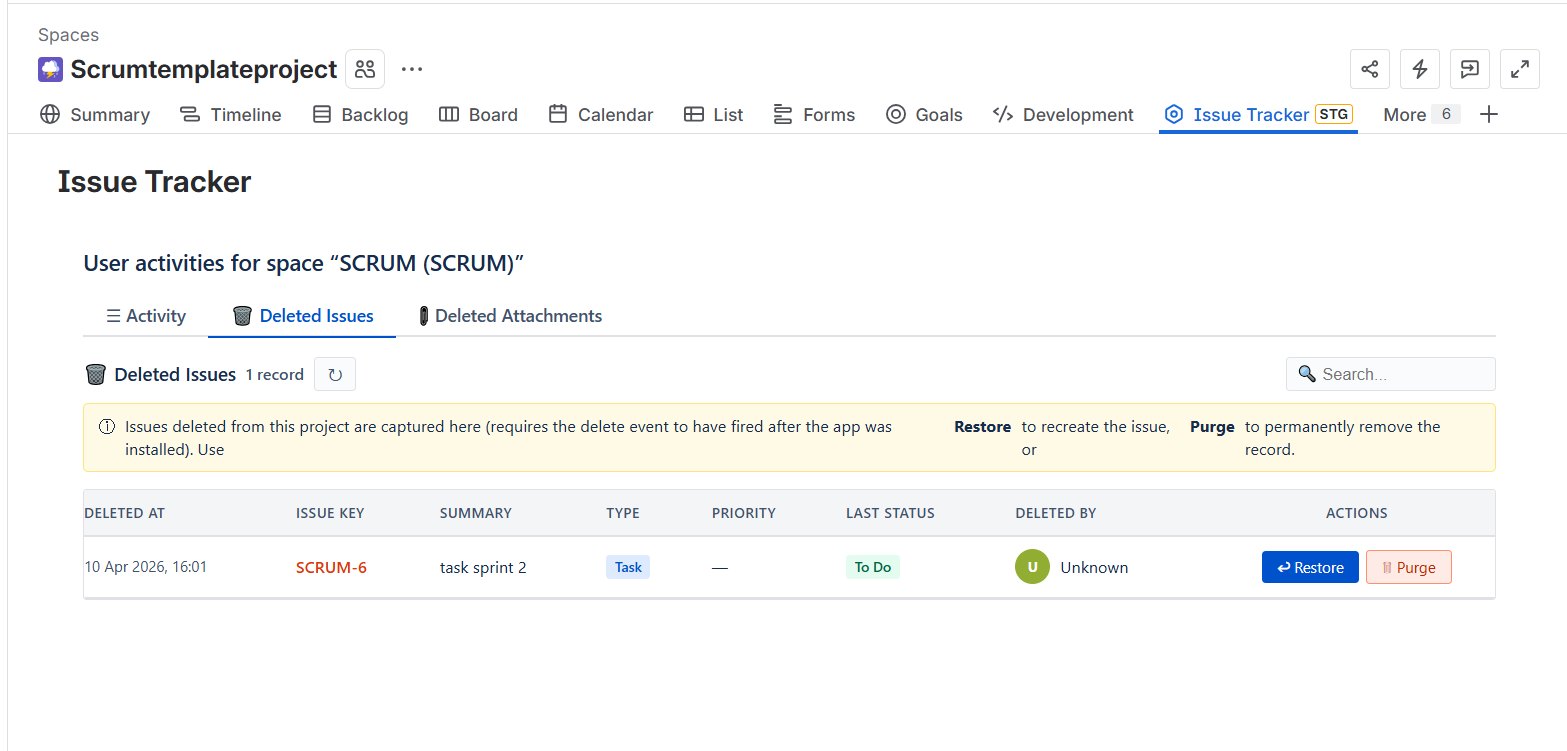
- Restore — Attempts to move the issue back to an active status via the Jira API. Shows a toast on success or failure.
- Purge — Permanently deletes the issue from the KVS store (cannot be undone). Shows a confirmation prompt before running.
3.5 Saved Reports
Where: Available inside both the Issue Panel and the Project Activity page via the Saved Reports button.
How to save:
- Apply any combination of filters.
- Click the Saved Reports button → footer area → click Save current filters.
- Enter a name and press Save.
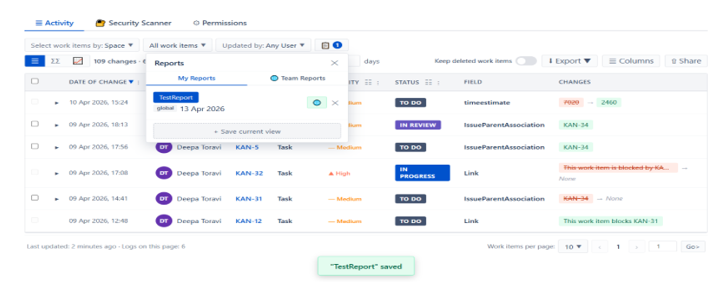
How to load:
- Open the Saved Reports panel.
- Find the report in the My Reports or Shared tab.
- Click Load — all saved filters are restored instantly.
Sharing: Click the share icon on any saved report to make it visible to all users of the app (Shared tab).
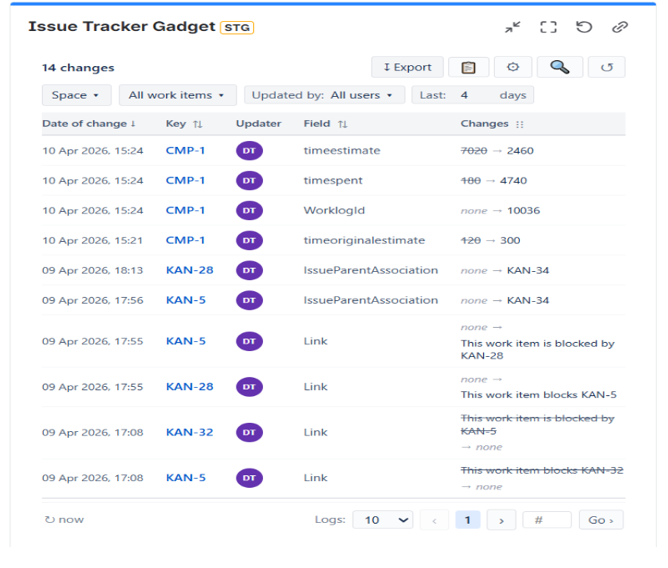
3.6 Dashboard Gadget
Where: Jira Dashboard → Add gadget → search Issue Tracker.
The Dashboard Gadget provides a compact, real-time view of issue history data directly within Jira dashboards, enabling quick monitoring and analysis without navigating away.
Features:
- Advanced Filtering — Configure data using project scope, date range (preset or custom), assignee, specific fields, and JQL for precise results.
- Customisable Columns — Show or hide columns based on user preference for a tailored view.
- Auto-Refresh — Automatically updates data at set intervals to keep information current.
- Export Capability — Easily export data for reporting or external analysis.
- Optimised Layout — Compact table design ensures clarity and usability within limited dashboard space.
Configuration:
- Open your Jira dashboard (or create one if you don't have it).
- Search and add Issue History Gadget.
4. Security Scanner
The Security Scanner feature in the Issue History module is designed to detect sensitive data (PII & DLP violations) across Jira issues.
It helps teams identify and manage risks related to:
- Personally Identifiable Information (PII)
- Confidential or restricted data
- Compliance violations (e.g., GDPR, internal policies)
Purpose:
- Scan Jira issue data for sensitive content.
- Prevent accidental exposure of confidential information.
- Provide filtered insights based on severity, type, and time.
Scan Mode Options:
- Current fields & comments — Scans only the latest data in issues. Faster and suitable for quick checks.
- Include full history — Scans entire issue history, including old descriptions, edited comments, and field changes. Useful for deep audits and compliance checks.
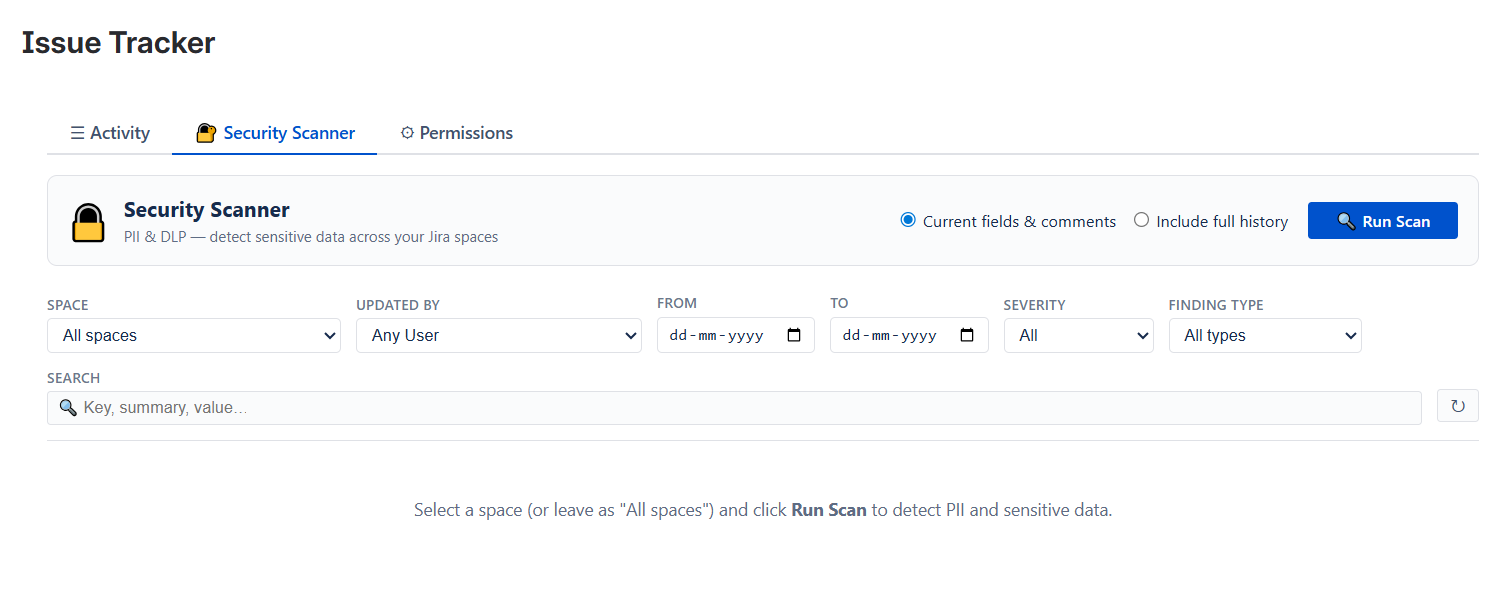
Available Filters:
- Space — Select a specific Jira project/space or scan All spaces.
- Updated By — Filter issues based on the user who made changes.
- Date Range (From – To) — Scan issues updated within a specific timeframe.
- Severity — Low · Medium · High · Critical.
- Finding Type — Email · Phone number · Credit card · API keys · Custom pattern.
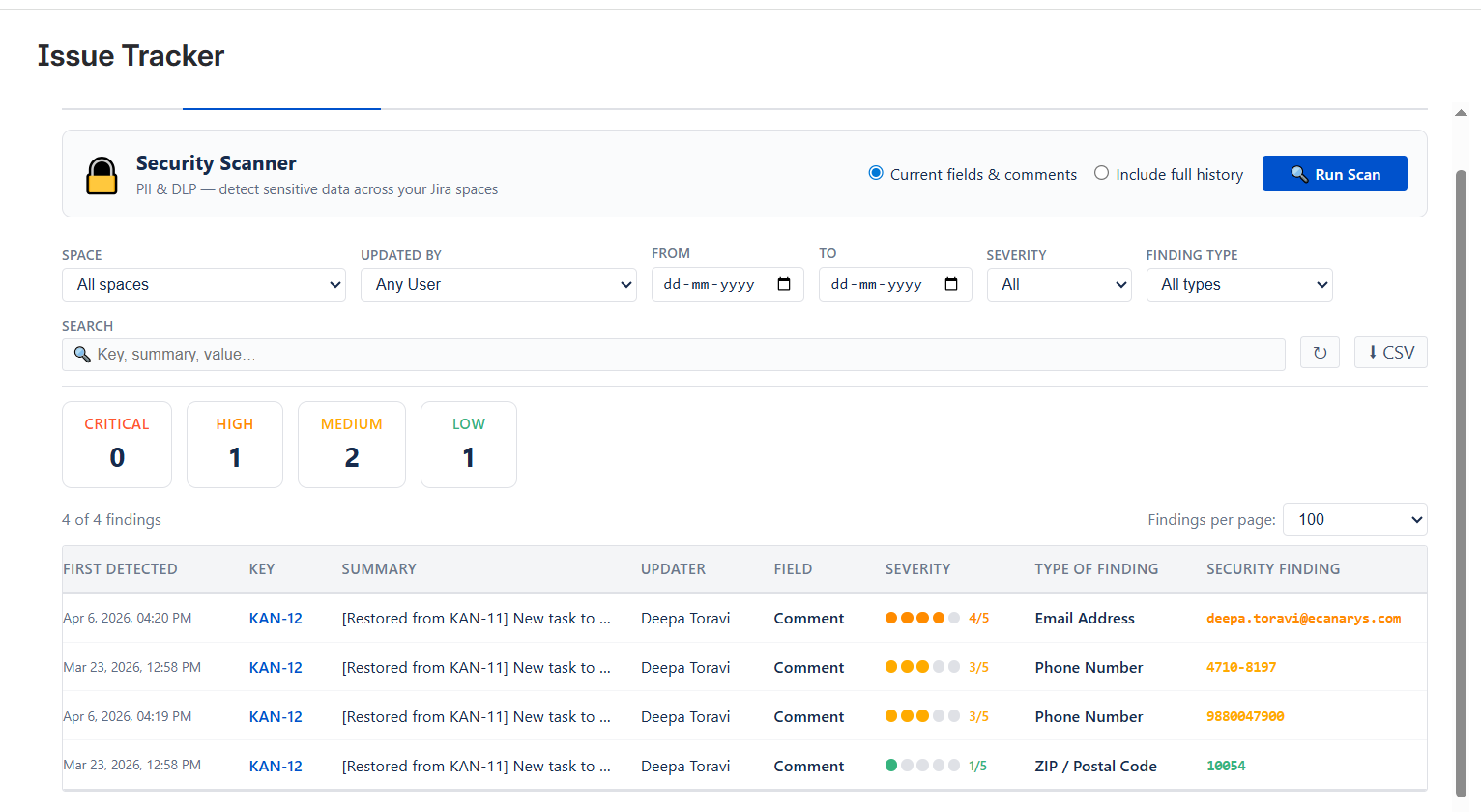
5. Filters Reference
- Date Range (Presets): Available in the Issue Panel and Global Page, including options such as Today, Yesterday, This Week, Previous Week, Last 7 Days, Last 28 Days, This Month, and Previous Month.
- Custom Date Range: Available in the Issue Panel and Global Page with From and To date pickers. The To date is inclusive (covers the entire end day).
- Updated By: Available in all views as a searchable dropdown.
- Assignee: Available in the Project Page and Global Page as a searchable dropdown.
- Sprint: Available in the Project Page and Global Page as a dropdown.
- Issue Key: Available in the Project Page as a multi-select panel, showing per-key change counts.
- Field (Column Header): Available in all table views; becomes searchable when more than 8 unique fields exist.
- Label: Available in the Global Page with type-ahead search.
- Reporter: Available in the Global Page with user search.
- JQL (Jira Query Language): Available in the Global Page and Dashboard Gadget; supports any valid JQL query.
- Free-text Search: Available in all views; searches across all visible text columns.
6. Permissions Model
Three features can be restricted to specific Jira groups:
- Report: Access to the history table and all export functions
- Deleted Work Items: Visibility of the Deleted Issues tab
- Permissions: Ability to modify the app's permissions settings (delegation)
Site admins and project admins always retain access regardless of group settings.
Global Page → Permissions Tab:
Saves settings under the _global key. These settings apply to all projects by default, unless specifically overridden.
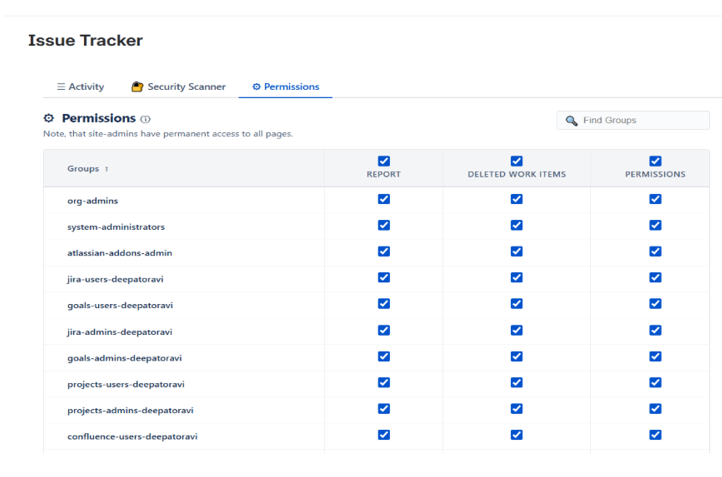
Who can change permissions:
- Site admins can always save permissions.
- Project admins can save permissions for their own project.
- Any group added to the Permissions feature column is also granted the ability to manage permissions (delegation).
7. Terms of Service
1. Acceptance of Terms
By installing, accessing, or using the Issue Tracker for Jira application ("the App") from the Atlassian Marketplace, you ("User" or "you") agree to be bound by these Terms of Service ("Terms"). If you are installing the App on behalf of an organization, you represent and warrant that you have the authority to bind that organization to these Terms. If you do not agree to these Terms, you must not install or use the App.
2. Description of the App
Issue Tracker for Jira is a Forge-based Atlassian Marketplace application that provides:
- Issue-level change history tracking
- Sprint history tracking
- Project-level analytics and dashboards
- PII and DLP security scanning across Jira issues
- Deleted issue and attachment recovery
- Dashboard gadgets for live team activity
- Saved reports and group-based permissions
The App operates entirely within Atlassian's Forge infrastructure and integrates with Jira Software, Jira Service Management, and Jira Work Management.
3. License Grant
Subject to your compliance with these Terms, we grant you a limited, non-exclusive, non-transferable, and revocable license to:
- Install and use the App within your Atlassian Jira environment
- Use the App's features as described in the Marketplace listing
You must not:
- Copy, modify, reverse-engineer, decompile, or disassemble the App
- Resell, sublicense, or redistribute the App
- Use the App to develop a competing product
- Remove or obscure any proprietary notices
4. Atlassian Marketplace Terms
The App is distributed through the Atlassian Marketplace. Your use of the App is also subject to:
- Atlassian Marketplace Terms of Use
- Atlassian End User Agreement
In the event of any conflict between these Terms and Atlassian's terms, Atlassian's terms will prevail with respect to Marketplace-related matters.
5. Free and Paid Plans
5.1 Free Features
The following features are available at no cost:
- Issue history panel (single issue view)
- Date filtering
- Sprint history tab
- Comment tracking
5.2 Paid Features
Standard and Advanced features are subject to pricing listed on the Atlassian Marketplace at the time of subscription. Billing is handled entirely by Atlassian. We do not process or store payment information.
5.3 Trials
Free trials may be offered as listed on the Marketplace. After the trial period ends, access to paid features will be restricted unless a subscription is purchased.
App Features
The App provides the following features as listed on the Atlassian Marketplace:
- Issue History Panel — View the complete change history of any Jira issue, including all field changes with previous and updated values, directly within the issue activity panel.
- Comment Tracking — Track comment additions and edits, including the full comment content inline.
- Date Filtering — Filter issue history using predefined ranges (Today, This Week, Last 7/28 days) or a custom date range.
- Sprint History — View a visual timeline of all sprint movements for an issue, including who moved it, and the source and destination sprints.
- Project-Level Analytics Dashboard — Access aggregated change statistics, frequently modified fields, status transition charts, and team activity insights across all issues within a project.
- Status Transition & Timeline Charts — Visualize how issues progress through workflow statuses over time.
- Dashboard Gadget — Embed a live issue change feed into Jira Dashboards with support for issue key filtering and saved reports.
- Saved Reports — Save, load, and share filter configurations for consistent and repeatable views.
- Security Scanner (PII & DLP) — Scan Jira issue content for sensitive information such as email addresses, credit card numbers, SSNs, API keys, IBANs, passport numbers, phone numbers, and IP addresses, with severity classification.
- Deleted Issues Tracking & Recovery — Track deleted issues with complete metadata and allow project administrators to restore them as new issues or permanently delete the records.
- Deleted Attachments Tracking & Recovery — Track removed attachments with metadata and restore cached files (up to 280 KB) to any Jira issue.
- Group-Based App Permissions — Enable project administrators to restrict access to specific features based on Jira user groups.
Feature availability by plan tier, pricing, billing, and trial details are managed through the Atlassian Marketplace. We do not process or store any payment information. Access to certain features may be restricted after the trial period unless an active subscription is maintained.
6. Acceptable Use
You agree to use the App only for lawful purposes and in accordance with these Terms. You must not:
- Violate any applicable laws or regulations
- Infringe upon the intellectual property rights of others
- Attempt unauthorized access to systems or data
- Introduce malware, viruses, or harmful code
- Extract or scrape data in bulk beyond intended use
- Misuse the security scanning features to target or harass individuals
7. Data and Privacy
Your use of the App is also governed by our Privacy Policy.
Key points include:
- All data remains within Atlassian's Forge infrastructure
- We do not sell, transfer, or process your data externally
- You are responsible for ensuring compliance with applicable data protection laws within your organization
8. Modifications
8.1 Changes to the App
We may modify, suspend, or discontinue the App at any time. Where possible, we will provide advance notice of significant changes.
8.2 Changes to Terms
We may update these Terms periodically. Updated Terms will take effect upon publication. Continued use of the App constitutes acceptance of the updated Terms.
9. Termination
These Terms remain in effect until terminated.
- You may terminate by uninstalling the App at any time
- We may terminate access if you breach these Terms and fail to remedy the breach within 14 days
Upon termination, all licenses granted under these Terms will cease. Data stored in Forge KVS will be deleted according to Atlassian's policies.
10. Governing Law
These Terms shall be governed by the laws of India. Any disputes shall be subject to the exclusive jurisdiction of the courts of India.
11. Severability
If any provision of these Terms is found to be invalid or unenforceable, the remaining provisions will continue in full force and effect.
12. Entire Agreement
These Terms, together with the Privacy Policy and applicable Atlassian terms, constitute the entire agreement between you and Issue Tracker regarding the App.
8. Privacy Policy
1. Introduction
This Privacy Policy describes how Issue Tracker ("we", "our", or "us") collects, uses, and protects information when you use the Issue Tracker for Jira application ("the App") available on the Atlassian Marketplace. By installing or using the App, you agree to the practices described in this Privacy Policy.
2. About the App
Issue Tracker for Jira is a Forge-based application built on Atlassian's Forge platform. It provides features such as issue history tracking, sprint history, analytics dashboards, PII/DLP security scanning, deleted issue recovery, and related capabilities within your Jira environment.
3. Data Accessed by the App
To provide its features, the App accesses the following data within your Atlassian Jira environment:
| Data Type | Purpose |
|---|---|
| Jira issue fields and change history (changelog) | Display full history of issue changes |
| Jira issue comments | Show comment additions and edits in the timeline |
| Jira user display names and account IDs | Attribute changes to the correct users |
| Jira project keys and project names | Scope reports and analytics to projects |
| Jira sprint data | Display sprint history and movement timelines |
| Jira issue attachment metadata | Track deleted attachments for recovery |
| Jira group membership | Enforce group-based permissions |
The App does not access:
- Passwords or authentication credentials
- Billing or payment information
- Data from other Atlassian products (unless explicitly stated)
- Any data outside the Atlassian environment
4. How Data Is Stored
The App is built on Atlassian Forge and uses Atlassian Forge Key-Value Storage (KVS) as its only data store.
This means:
- All data is stored exclusively within Atlassian's infrastructure
- No data is transmitted to, stored on, or processed by external servers operated by us
- Data is protected by Atlassian's security, redundancy, and compliance controls
- We do not have direct access to your data; it resides within your Atlassian tenant
For more information, refer to Atlassian's Trust Center.
5. Data Stored by the App
The App stores the following data in Forge KVS, scoped to your Atlassian site:
| Stored Item | Purpose | Retention |
|---|---|---|
| Issue change event records | Build issue history timelines | Until manually deleted or app uninstalled |
| Deleted issue snapshots | Enable issue recovery | Until deleted by admin or app uninstalled |
| Deleted attachment records | Enable attachment recovery | Until deleted by admin or app uninstalled |
| Saved report configurations | Restore saved filters/views | Until deleted by user |
| App permission settings | Manage group-based access | Until modified by admin |
6. Data Sharing
We do not:
- Sell your data to any third party
- Share your data with advertisers
- Transfer your data to external systems
- Use your data beyond providing App functionality
Data may only be accessed by:
- Atlassian (as the infrastructure provider)
- Your Atlassian administrators (via standard admin controls)
7. Data Retention
- Data is retained as long as the App remains installed
- When the App is uninstalled, all associated data is automatically deleted by Atlassian
- Project administrators can manually delete stored data at any time
8. Security
The App relies on Atlassian Forge's built-in security, including:
- Encryption in transit and at rest (TLS)
- Scoped API permissions (least-privilege access)
- No external credential storage
- Authentication handled by Atlassian
All permissions are declared in the manifest.yml and limited to what is necessary.
9. Your Rights (GDPR & Privacy Laws)
If you are in the EEA, UK, or another region with data protection laws, you have the right to:
- Access — View your data within the App
- Deletion — Request deletion or uninstall the App
- Portability — Export data (CSV/Excel)
- Objection — Contact us for concerns
For Atlassian-managed data, please contact Atlassian directly.
10. Children's Privacy
This App is intended for professional use in business environments and is not designed for individuals under 16. We do not knowingly collect data from children.
11. Changes to This Policy
We may update this Privacy Policy from time to time. When we do:
- The "Last Updated" date will be revised
- Updates will be communicated via the Marketplace or release notes
Continued use of the App indicates acceptance of the updated policy.
More Info
| Released on: | 2025-04-01 |
| Last updated: | 2025-04-21 |