
GitLab – Azure Boards Integrator
Seamlessly links GitLab activities to Azure DevOps work items via webhooks instantly



Stop Manual Linking: GitLab – Azure Boards Integrator Made Simple
Introduction
Many development teams use GitLab for source code management and CI/CD, while relying on Azure DevOps Boards to track requirements, bugs, and user stories. Although both tools are powerful, they work as separate systems, often leaving teams with broken or incomplete traceability.
GLAB Integrator solves this problem by providing a fully managed integration service. As an end user, you simply consume a secure API endpoint — no setup, no configuration. We take care of everything behind the scenes.
The Problem
Common challenges teams face include:
- GitLab and Azure DevOps are not natively connected
- Manual linking of commits and merge requests in Azure Boards work items
- Inconsistent linking practices across teams
- Poor visibility during audits and reviews
Here, teams want automation,
The Solution: GitLab Azure Boards Integrator (GLAB)
GLAB Integrator automatically connects GitLab activities to Azure DevOps work items via webhook events.Users can reference Azure DevOps work items using the case-sensitive format: (where NNNN is your Azure Boards work item ID).We instantly create bi-directional, clickable hyperlinks between GitLab and Azure DevOps.
What You Do as a User
Configure a single webhook in your GitLab project:
- Select required events
- Configure required headers
- Add Personal Access Tokens (PAT)
Reference work items using the keyword
GLAB#NNNNin:- Commit messages
- Merge Request titles and descriptions
- Comments on Merge Requests and commits
That’s it.
No configuration files. No ongoing maintenance on your side.
See in Action
In GitLab

Fig: GLAB#30210 is automatically converted into a clickable Azure Boards link
In Azure Boards Side
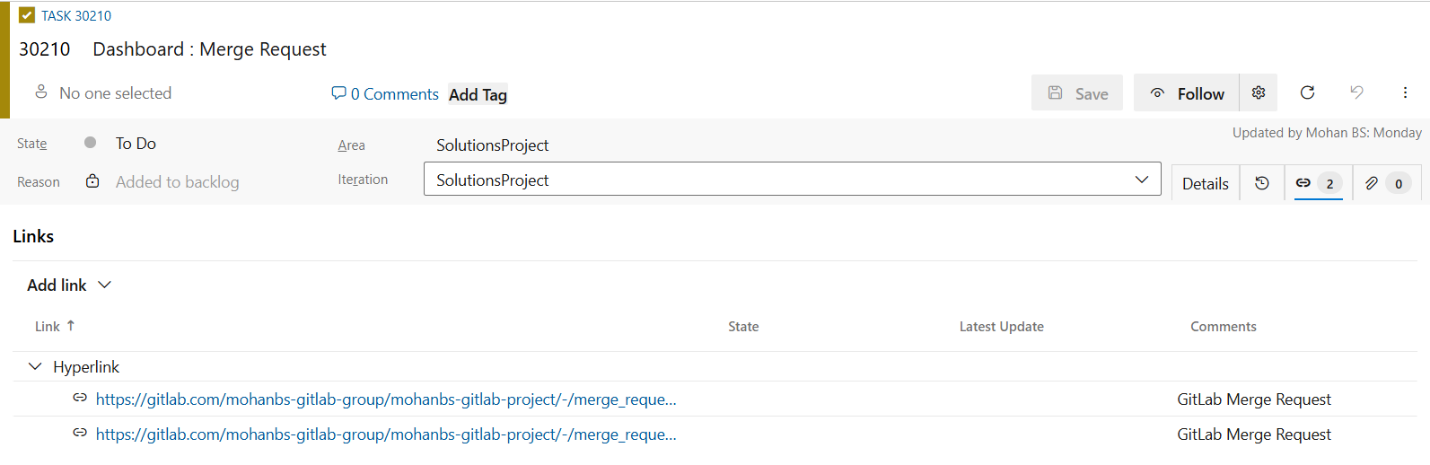
Fig: Azure Boards work item automatically updated with a hyperlink to the related GitLab merge request
What We Manage for You
- Secure webhook request validation
- Event filtering and processing
- Bi-directional linking
- Duplicate link prevention
Supported GitLab Activities
Automatic linking is supported for:
Merge Requests
- Create and update events
- Work items mentioned in titles or descriptions
Push Events
- Work items referenced in commit messages
Comments
- Work items mentioned in merge request or commit discussions
How It Works
You mention an Azure DevOps work item in GitLab using:
GitLab triggers a webhook event
We process the event instantly:
- Extract work item ID
4567 - Validate the work item exists in your Azure DevOps organization
- Check for duplicate links
- Results appear immediately:
- Azure Boards
A new hyperlink is added to work item4567with the related commit or merge request URL - GitLab
GLAB#4567becomes a clickable link to the Azure Boards work item
All linking happens automatically and consistently.
Key Benefits
Full Traceability
Instantly link code changes to requirements — ideal for compliance, audits, and impact analysis.Zero Manual Effort
No copying URLs or manual linking.Consistency Across Teams
Uniform linking behavior across projects and developers.Better Visibility
Reviewers and stakeholders get direct context in both tools.
Security and Access
- Secure, authenticated API endpoint
- Token-based access
- No data exposure
- Minimal PAT scopes required:
- Azure DevOps: Work Items (Read/Write)
- GitLab: API access
Who Is This For?
GLAB Integrator is ideal for:
- Teams using GitLab and Azure DevOps together
- Organizations that want traceability without custom tooling
- Enterprises with compliance and audit requirements
- Teams that prefer managed services over self-hosted integrations
Ready to Get Started?
If you're tired of manual linking and want effortless traceability between GitLab and Azure DevOps, this managed service is exactly what you've been waiting for.
Contact us today to enable it for your organization — we’ll guide you through the quick webhook setup in GitLab, and you’ll start seeing automatic links in minutes.
Transform your DevOps workflow with true end-to-end visibility.
More Info
| Released on: | 2026-01-02 |
| Last updated: | 2026-01-03 |